
Xingshuo RET and CET RF Handpiece System
October 21, 2026
Xingshuo 448K RF Equipment for Distributor Review
October 21, 2026
Xingshuo JMD EMS and RF Equipment
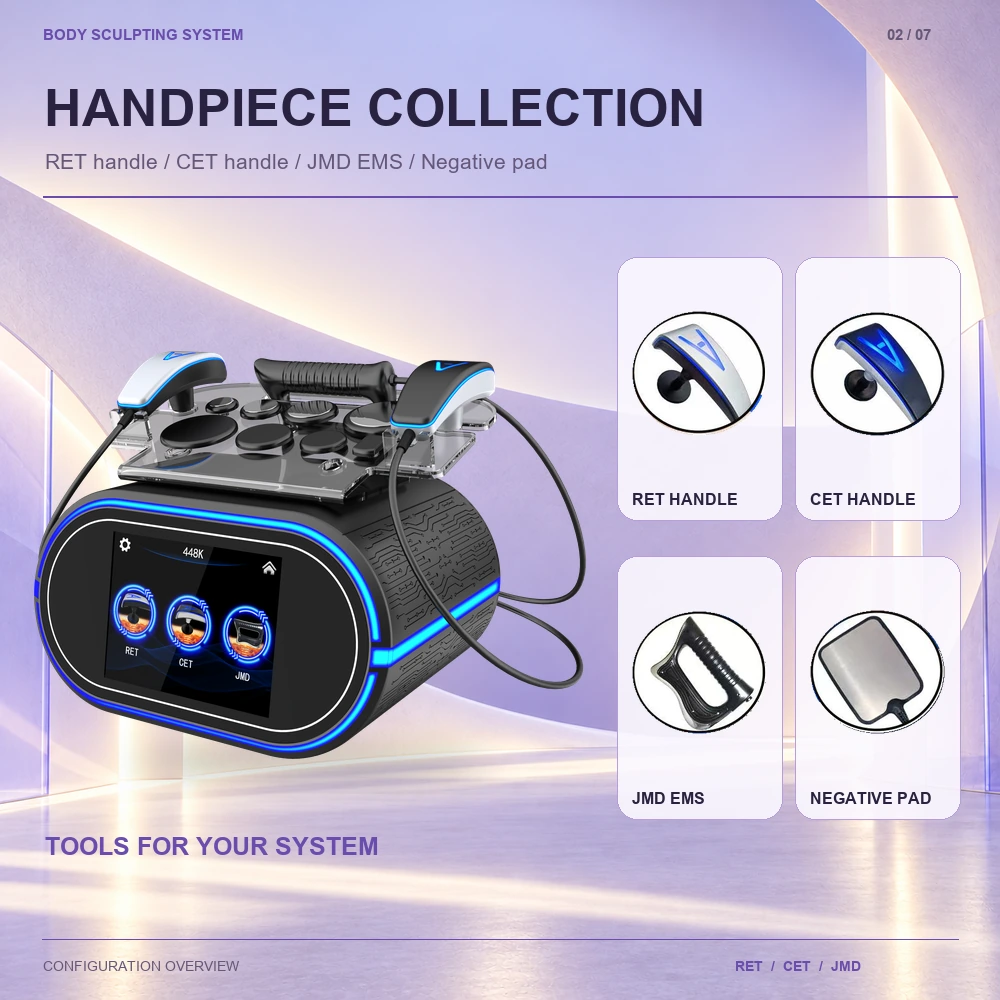
Identify the JMD EMS handpiece within the Xingshuo accessory collection. The illustrated setup names four component groups: RET handle, CET handle, JMD EMS and negative pad. This guide helps buyers ask component-specific questions without confusing the JMD handpiece with the two RF handle sets.
Get Quote on WhatsApp — Select Buyer Type
Include your country, business type and required quantity for a faster reply.

JMD EMS component identification
Identify the JMD EMS handpiece within the Xingshuo accessory collection. The illustrated setup names four component groups: RET handle, CET handle, JMD EMS and negative pad. This guide helps buyers ask component-specific questions without confusing the JMD handpiece with the two RF handle sets.
Locate the JMD EMS handpiece in the illustrated collection
The artwork labels the black, grip-shaped component as JMD EMS. The RET and CET handles are shown in separate labelled circles, while the negative pad is presented as its own item. These visual labels are useful when requesting an accessory list or clarifying a photograph with the supplier.
The front display abbreviates the corresponding label to JMD. Include both the JMD screen label and the JMD EMS accessory name in documentation enquiries so the requested manual section and the physical handpiece can be matched.
A component-specific document request
| Document or detail | Question to resolve |
|---|---|
| Component identification | What part reference identifies the JMD EMS handpiece supplied with this order? |
| Connection information | Which documented connector and connection procedure apply to that component? |
| Operating instructions | Which manual section covers preparation, controls and permitted professional use? |
| Care instructions | What cleaning, inspection and storage procedure is specified? |
| Supply scope | Which related items are included, optional or ordered separately? |
Keep visual identification separate from operating claims
A labelled accessory image establishes how the component is presented in this product material. It does not provide a waveform, output range, operating duration or a treatment protocol. Request the current technical sheet and instructions for the final configuration when those details are needed for a purchasing decision.
The negative pad is shown alongside the handpieces. Ask the supplier to explain its documented role and connection for the selected configuration. A shared accessory photograph alone does not establish that every component should be connected or operated together.
JMD EMS questions
Is this a standalone JMD EMS product?
This listing presents the JMD EMS component of the same Xingshuo RF system. Availability of any item separately should be confirmed in a quotation.
Is JMD one of the four RET or CET probe heads?
The supplied illustrations name JMD EMS separately. The eight RF-head inventory consists of four RET heads and four CET heads.
What makes a useful support enquiry?
Provide the Xingshuo model name, the component label, the order reference and a clear photograph. Request the manual section or part identification needed to answer the specific question.
JMD EMS support enquiry record
| Information | What to provide |
|---|---|
| Equipment reference | Xingshuo model, order reference and available component label |
| Visual evidence | A clear handpiece photograph and the relevant screen label |
| Document reference | Manual revision and section requiring clarification |
| Question | Describe the exact identification, care or connection question without assuming compatibility |
Use this record with the console display guide to distinguish a screen-label question from a physical-component question. Seek the model-specific instructions before making a connection or changing an operating setting.
Model reference and related information
This guide concerns the same Xingshuo 448K RET/CET and JMD EMS system. Its topic-specific photographs do not identify a separate hardware configuration.